A full photo studio. In a browser tab.
Layers, masks, Camera Raw, PSD, RAW decoding, local AI retouch and a motion timeline — powered by WebAssembly and running entirely on your device.

Every part of the job has a page.
RAW, PSD, layers, AI, batch, gallery, Drive, motion, print and mobile — each workspace has a detailed guide, not a feature bullet.
RAW Photo Editor
Open CR2, CR3, NEF, ARW, DNG and more — decoded on your device with LibRaw WebAssembly.
PSD Editor
Open layered Photoshop files, edit text and effects, and export a layered PSD again.
AI Retouch & Object Removal
Remove distractions and rebuild a scene with MI-GAN running locally through ONNX Runtime WebAssembly.
Batch Photo Editor
Process a whole folder — RAW, HEIC, TIFF, PSD and standard images — into one ZIP.
Photo Gallery & Library
Bring a whole shoot into one local gallery, search it, open any frame, or send a selection to bulk edit.
Lightroom-Style Develop
Tone, colour, detail and effects in one focused workspace — with a real before/after.
Print, CMYK & PDF
16-bit TIFF, ICC-managed CMYK separations and press-ready PDFs with bleed and crop marks.
Tablet & Phone Editor
A real layer editor on a phone or Android tablet, with touch, pinch-zoom and S Pen pressure.
Photoshop muscle. Lightroom flow.
A dark, dockable desktop shell for precise editing, with a Lightroom-style Develop workspace for finishing photos fast.
Real layers, masks and comps
Blend modes, adjustment layers, editable masks, layer styles, positional layer comps and pixel-accurate undo.
Layers & masksWebAssembly at the core
LibRaw, libvips, libheif, OpenCV and ONNX Runtime run locally in the tab. No uploads, no server queue.
RAW editorLocal AI retouch
MI-GAN 512 for AI spot clean and scene rebuild, MODNet for portrait cutouts, GrabCut for general subjects.
AI retouchRAW to print formats
Open ARW, CR2, NEF, DNG, HEIC, PSD, TIFF and more. Export 16-bit TIFF/PNG, AVIF, JPEG XL or ICC CMYK.
Format converterMotion timeline
Animate layer position, scale, rotation and opacity on a keyframe timeline and export a real WebM video.
Motion timelineLive collaboration
Share a room link and edit the same document with live presence, layer-level sync and reconnects.
CollaborationPrint-ready output
RGB or CMYK PDFs with bleed, crop marks, ICC output intent and effective-DPI estimates.
Print & CMYKTouch and stylus ready
Pinch zoom, two-finger pan, pressure-sensitive S Pen painting and a phone layout that still exposes the tools.
Mobile editorAI that stays on your device.
Remove distracting objects, rebuild a scene, cut out a portrait or select a subject without uploading a single pixel. Models download once and then run in the tab through ONNX Runtime WebAssembly and OpenCV.
- AI spot clean — MI-GAN 512 fills masked objects with plausible surroundings.
- Scene rebuild — repaint a whole selected area, not just a thin heal line.
- Portrait cutout — MODNet produces a soft alpha matte for people.
- Subject select — GrabCut handles general objects and feeds masks or removal.
Mask an object with the Remove brush. The local model reconstructs the background.
Select a larger area and let the model repaint the scene with surrounding context.
Two thousand frames. One quiet workflow.
Wedding work is not one perfect edit; it is a thousand small decisions made on a deadline. Bring the whole shoot into the local gallery, pick the keepers, grade the story, and batch the delivery without bouncing files through three cloud tools.
Import a folder or Drive library, search by name, multi-select and open or batch in one move.
Pick a wedding recipe or type a look prompt, then auto-match the rest of the folder locally with skin-aware tone analysis.
Export web JPEGs and print files from the same local document; the client’s photos never leave the machine.
Turn the still into a story.
Animate layers with position, scale, rotation and opacity keyframes. Scrub the playhead, use the Ken Burns preset and export a WebM without leaving the tab.
Explore the motion timeline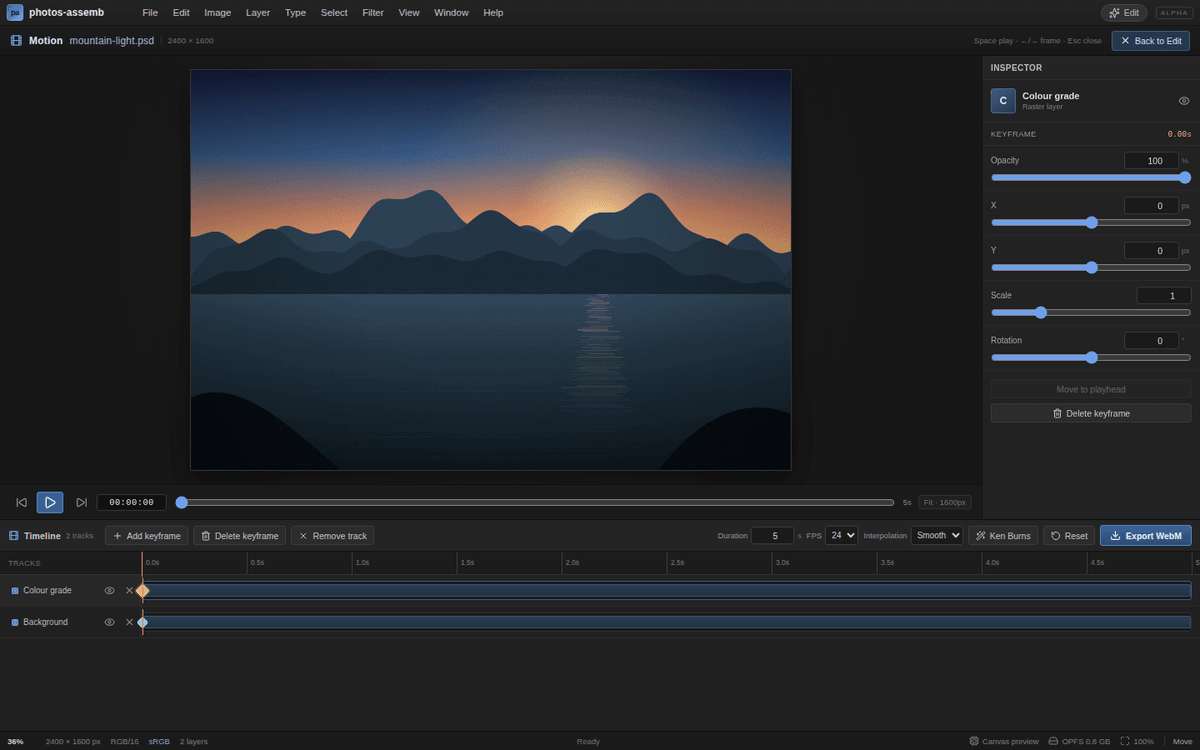
One editor for the whole camera bag.
Decode RAW, HEIC, PSD, TIFF, JPEG, PNG, WebP, AVIF and JPEG XL. Export at full resolution to the formats your client or printer asks for.
See the format converterOne studio. Three moves.
No import queue, no export round trip between tools.
Bring the whole shoot
Drop a folder into the Gallery or import from Google Drive. Search, sort and select without uploading a frame.
02Edit the keepers
Decode RAW, grade in Develop, retouch with layers and masks, or clean distractions with local AI.
03Batch the delivery
Send a multi-selection to the batch processor for shared tone, resize, sharpen and a single ZIP.
Questions, answered.
The short version: local, private, browser-native, with honest limits.
Is photos-assemb really running on my device?
Yes. Photo decoding, editing, compositing and most exports run in the browser through WebAssembly. Images are not uploaded to an editing server.
Can I open RAW and PSD files?
Yes. LibRaw WebAssembly decodes CR2, CR3, NEF, ARW, DNG, RAF, ORF, RW2 and more. PSD/PSB files open with layers, masks, adjustment layers, text metadata and native effects.
Is there a subscription or an account?
The current build has no account requirement and no subscription wall. Open the editor and work locally in the tab.
Can I edit a whole wedding shoot?
Import a folder into the Gallery, search and select frames, then send a multi-selection to the batch processor. Wedding recipes, local look prompts and skin-aware auto tone keep a folder consistent; very large folders should be split into runs because browser memory is the limit.
Does it work on a phone or tablet?
Yes. The layout adapts to narrow screens, the canvas supports pinch zoom and two-finger pan, and stylus pressure is used by the brush where the browser exposes it.
Does the AI send my photos to the cloud?
No. MI-GAN inpainting, MODNet matting and the local analysis tools run through ONNX Runtime WebAssembly in the tab. Models download once and are cached by the browser.
Can I work offline?
The PWA caches the application shell and hashed assets, and downloaded AI/WASM runtimes can be pre-cached. The first visit and any uncached model still need a connection.
How does collaboration work?
Open the editor with ?collab=<room> and share the link. Layer changes sync through a Cloudflare Durable Object with a last-writer-wins model, presence and reconnect snapshots.
Open a photo. Start editing.
Works on a laptop, a tablet and a phone. Bring a stylus if you have one.